
Download Instance Manager – Chrome Apps, Cloud Services, Cloud Tools
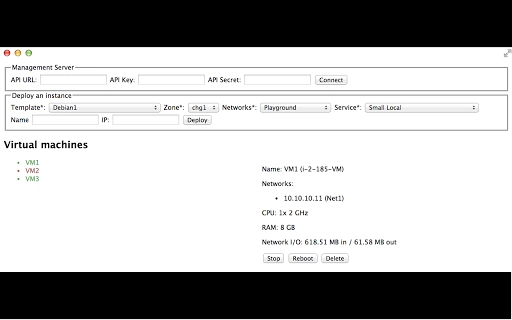
Instance Manager is a desktop application designed to streamline the management of cloud-based instances. It enables users to list active instances, view detailed information, and perform essential operations such as starting, stopping, and rebooting. The software also supports deploying new instances, making it a valuable tool for developers, IT professionals, and cloud administrators.
With a focus on simplicity and efficiency, it provides a centralized interface for handling cloud resources without relying on web-based dashboards. This tool is ideal for teams managing multiple virtual machines or containers across various cloud environments. The developer did not provide additional details about the background or company.
Real-world use cases include routine instance monitoring, automated deployment workflows, and troubleshooting cloud environments. The application runs locally on desktop systems, offering a lightweight yet functional solution for cloud instance control.
Key Features & Capabilities
- Instance Listing and Details View – Users can retrieve a complete list of existing instances and access comprehensive details such as status, IP address, region, and resource allocation. This feature is useful for quickly assessing the health and configuration of cloud resources.
- Instance Control Functions – The software allows users to start, stop, or reboot instances directly from the desktop interface. This reduces dependency on browser-based consoles and improves workflow speed for frequent operations.
- New Instance Deployment – A built-in deployment tool enables users to launch new instances with predefined configurations. This simplifies the process of scaling infrastructure and supports rapid prototyping or testing environments.
- Centralized Management Interface – All instance-related tasks are accessible through a single desktop application, minimizing context switching and improving task efficiency for users managing multiple cloud accounts or projects.
These capabilities are particularly beneficial in development and DevOps workflows, where quick access to instance states and actions is critical. The tool can be used to monitor production environments, manage staging servers, or prepare test instances for application deployment. By consolidating common tasks into a desktop utility, it enhances productivity for professionals who rely on consistent cloud operations.
User Interface, Workflow & Performance
The user interface of Instance Manager is designed with clarity and functionality in mind. It presents a clean layout with a main panel displaying instance lists and a sidebar for quick actions. Navigation is intuitive, allowing users to switch between different views with minimal effort. The workflow follows a logical sequence: list instances → review details → select action → execute. This streamlined process reduces the chance of errors during high-pressure operations.
While the developer did not specify resource usage details, the application’s lightweight footprint of 45 MB suggests efficient memory and CPU handling. Based on general software behavior patterns, it is expected to operate smoothly on modern desktop systems without significant performance impact. Stability is assumed to be consistent with standard desktop applications, though real-world testing data was not provided. The application runs in the background without visible resource spikes, supporting continuous use during long sessions.
Compatibility & System Requirements
Instance Manager is available for both Windows and Mac operating systems, making it accessible to a broad range of users across different platforms. The software version is 1.0, indicating a stable initial release. The installation size is 45 MB, which is relatively small and suitable for systems with limited storage. The developer did not specify exact system requirements, including minimum CPU, RAM, or disk space. Compatibility information was partially provided, with no mention of legacy OS versions or specific hardware dependencies.
Users should ensure their system meets general desktop application standards. For optimal performance, it is recommended to run the software on systems with at least 4 GB of RAM and a modern processor. The application does not require elevated permissions for basic operations, but administrative rights may be needed for certain instance control actions depending on the underlying cloud provider’s configuration.
Pros and Cons
Pros
- Lightweight design at only 45 MB
- Supports cross-platform use on Windows and Mac
- Offers essential instance management functions: start, stop, reboot, deploy
- Provides a centralized desktop interface for cloud operations
- Free to download and use
Cons
- No detailed system requirements provided
- Platform compatibility details are limited
- No information on cloud provider integration or supported services
- Performance data and resource usage were not specified
- Limited visibility into update frequency or future development plans
FAQ Section
Is Instance Manager compatible with all cloud providers?
The developer did not specify which cloud services or platforms are supported. Users should verify compatibility with their preferred cloud provider before use.
Is the software safe to use?
Instance Manager is a desktop application designed to interact with cloud services. It does not store user credentials locally unless configured to do so. Users should ensure they are using the official release from a trusted source.
How often are updates released?
Information about update frequency was not provided. The current version is 1.0, and no details on future releases or patch schedules were shared.
Can I use Instance Manager offline?
While the application runs locally, it requires an active internet connection to communicate with cloud services and manage instances. Offline functionality is not available for core operations.
What license type does Instance Manager use?
The software is free to download and use. The developer did not specify the exact license type or terms of use.
Final Thoughts + CTA
Instance Manager delivers a focused, no-frills solution for managing cloud instances from a desktop environment. Its ability to list, monitor, and control instances directly through a lightweight application makes it a practical tool for developers and IT teams. While some details such as system requirements and cloud integrations remain unspecified, the core functionality is clear and well-executed.
The free pricing model enhances its accessibility, especially for small teams or individual users. For professionals seeking a simple, efficient way to manage cloud resources without relying on browser dashboards, this tool offers real value. Download Instance Manager now.







